Browse visually
Navigate a clean folder tree and preview vector assets as thumbnails before placing them in your Illustrator file.
A clean extension panel for browsing, searching, and inserting vector assets directly inside Adobe Illustrator — from the built-in collection or your own personal library.
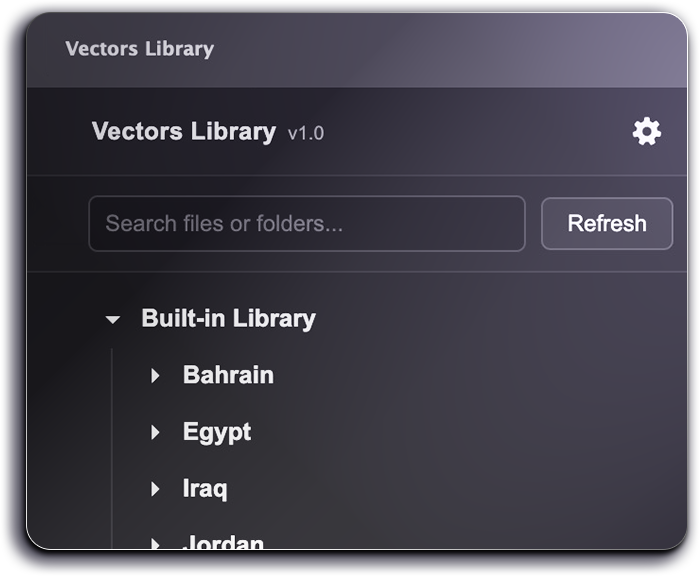
Simple by design
Vectors Library is made for the small moments that repeat all day: finding a logo, inserting a mark, testing icons, or reusing your own Illustrator-ready assets without leaving the document.
Navigate a clean folder tree and preview vector assets as thumbnails before placing them in your Illustrator file.
Find assets by filename, folder name, and indexed tags in the Pro library, while keeping user assets searchable by name.
Place vectors at the center of the active artboard or directly over the selected object, depending on your preference.
At a glance
A compact overview of the extension’s main behavior and supported library structure.
| Area | What it does |
|---|---|
| Built-in Library | Browse the packaged vector collection inside the extension. Suitable for logos, icons, marks, and reusable vector assets. |
| User Library | Point the extension to your own vector folder from Preferences using “Set User Library”. |
| Search | Quickly filter files and folders from the panel. Pro library can use indexed tags; personal assets use names. |
| Placement | Insert at the active artboard center or over the selected object, controlled by the “Insert over selected object” preference. |
| Files Supported | AI, PDF, SVG, and EPS, with optional preview images where needed. |
Contact
Report an issue, suggest a correction, or request a new vector asset for future updates.
Thank you. Your message has been sent.